About Device Info: Phone & Hardware
**Device Info gives you complete information about your Android phone in one place. Check phone specifications, RAM, storage, battery, sensors, display, cameras and hardware details, or test important hardware before...
**Device Info gives you complete information about your Android phone in one place. Check phone specifications, RAM, storage, battery, sensors, display, cameras and hardware details, or test important hardware before buying a used phone.**
### 📱 COMPLETE DEVICE INFORMATION
Get detailed information about your Android device, including:
• Manufacturer and brand
• Device model and product
• Android version and API/SDK level
• Build number and incremental version
• Hardware and board information
• Bootloader and fingerprint
• Supported ABIs
• Device ID and Android Device ID
• USB host information
• Root status and other system details
### 💾 RAM & STORAGE INFORMATION
Monitor your device resources directly from the dashboard:
• RAM usage and percentage
• Internal storage: used, free and total
• External storage: used, free and total
• System storage: used, free and total
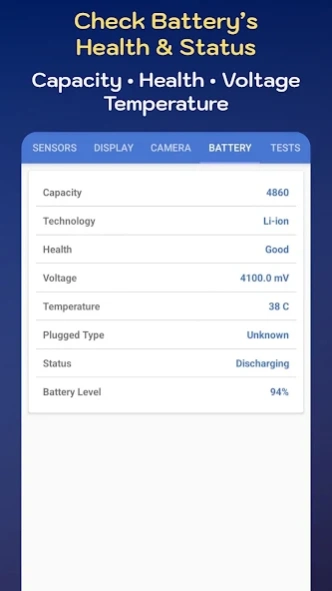
### 🔋 BATTERY INFORMATION
View important battery details including:
• Battery capacity
• Battery technology
• Battery health
• Battery level
• Voltage
• Temperature
• Charging/plugged type
• Charging status
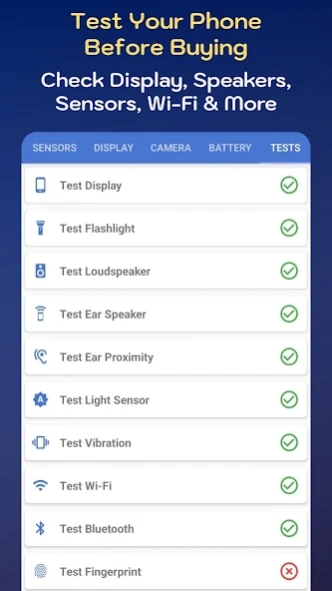
### 🧪 HARDWARE TESTS
Check whether important phone hardware is working correctly.
Hardware tests include:
• Display test
• Flashlight test
• Loud speaker test
• Ear speaker test
• Ear proximity test
• Light sensor test
• Vibration test
• Wi-Fi test
• Bluetooth test
• Fingerprint test
• Volume Up button test
• Volume Down button test
**Useful when checking a second-hand or used phone before purchasing.**
### 📷 CAMERA INFORMATION
View detailed information about the cameras available on your device.
Check information about different cameras and their supported capabilities.
### 📡 SENSOR INFORMATION
View all sensors available on your phone and explore detailed information about each sensor.
Check available sensors such as motion, light, proximity and other supported device sensors.
### 🖥️ DISPLAY INFORMATION
Get detailed information about your phone's display:
• Display size
• Screen resolution
• Screen density
• Font scale
• Display orientation
• Refresh rate
• Brightness mode
• Brightness level
• Screen timeout
### 📲 INSTALLED APPS
View applications installed on your device and separate them into:
• User-installed apps
• System-installed apps
### 📞 IMEI & DEVICE IDENTIFICATION
Use the Get Info section to access available device identification information such as IMEI, IMSI and UDID.
**Important:** On newer Android versions, access to IMEI information is restricted by the Android operating system. When IMEI cannot be accessed, the app provides instructions to check it using *#06#.
### 🛠️ USEFUL EVERYDAY TOOLS
Device Info also includes a collection of convenient tools:
• Currency tool
• Scientific calculator
• Stopwatch
• Protractor
• Periodic table
• Counter
• Compass
• Speed meter
• HEX to RGB
• Qibla direction
• Calendar
• Timer
• Bubble level
• Text to speech
• Random number generator
• Timestamp converter
### 🧮 CALCULATION TOOLS
Solve everyday calculations with built-in calculators:
• Area calculator
• Surface area calculator
• Perimeter calculator
• Volume calculator
• Permutation calculator
• Fraction calculator
• Proportion calculator
• Age calculator
• Mileage calculator
• Price calculator
• Binary calculator
• Aspect ratio calculator
• Scientific formulas
### 🔍 CHECK A USED PHONE BEFORE BUYING
Buying a second-hand Android phone?
Use Device Info to inspect device specifications and test important hardware components such as the display, speakers, sensors, buttons, fingerprint reader, Wi-Fi, Bluetooth, flashlight and vibration.
**Device Info is a convenient phone information and hardware testing tool for checking your Android device, understanding its specifications and testing supported hardware.**
Previous Versions
Here you can find the changelog of Device Info: Phone & Hardware since it was posted on our website on 2018-01-29 19:47:05.
The latest version is 6.0.0 and it was updated on 2026-10-10 15:35:41. See below the changes in each version.
Device Info: Phone & Hardware version 6.0.0
Updated At: 2026-08-05
Changes: - App is upgraded to support Android 17
- 'Timestamp Converter' is added in 'Tools' section
- 'Formulas' added in 'Calculations' section
Device Info: Phone & Hardware version 5.9.1
Updated At: 2025-09-16
Changes: - Updates done to support 16 KB page sizes
- UI Improvements
- Dependencies are updated
Device Info: Phone & Hardware version 5.9.0
Updated At: 2025-02-07
Changes: - 'Random Numbers Generator' is added in 'Tools' section.
- 'Percentage Calculator' is added in 'Calculations' section
Device Info: Phone & Hardware version 5.8.1
Updated At: 2024-10-06
Changes: - Currency Converter API is changed
Device Info: Phone & Hardware version 5.8.0
Updated At: 2024-09-07
Changes: - 'Battery Status' is added in 'Tools' section
- 'Aspect Ratio' is added in 'Calculation' section
Device Info: Phone & Hardware version 5.7.1
Updated At: 2024-08-28
Changes: - Top bar overlapping issue in Android 15 is fixed
Device Info: Phone & Hardware version 5.7.0
Updated At: 2024-08-21
Changes: - Application is upgraded to support Android 15 (API Level 35)
Device Info: Phone & Hardware version 5.6.1
Updated At: 2024-08-05
Changes: - Bug Fixing
Device Info: Phone & Hardware version 5.5.1
Updated At: 2024-03-26
Changes: - Bug fixed in 'Currency Converter'
Device Info: Phone & Hardware version 5.5.0
Updated At: 2024-02-06
Changes: - 'Precious Metals' in Tools section is discontinued due unstable data source.
Disclaimer
Official Google Play Link
We do not host Device Info: Phone & Hardware on our servers. We did not scan it for viruses, adware, spyware or other type of malware. This app is hosted by Google and passed their terms and conditions to be listed there. We recommend caution when installing it.
The Google Play link for Device Info: Phone & Hardware is provided to you by apps112.com without any warranties, representations or guarantees of any kind, so access it at your own risk.
If you have questions regarding this particular app contact the publisher directly. For questions about the functionalities of apps112.com contact us.